Two Notes Audio Engineering Torpedo Wall of Sound Win&Mac ÏäÌåÄ£Äâ
ÓãÀ×Òôǽ¡
¡ÊÇÑݽ²ÕߺÍÄ£ÄâÄ£Äâ²å¼þ¡£²å¼þÊÇÒ»ÖÖ¿ÉÒÔÔÚÒôÐòÆ÷¹ìµÀÉϼÓÔصÄÈí¼þ£¬ÀýÈçCubase£¬Logic£¬Pro Tools£¬Reaper¡£Äú¿ÉÒÔ´ÓÎÒÃǵÄTorpedoÊý×Ö»òÄ£Ä⸺ÔØÏäÖ®Ò»£¨ÎÞÉùµÄµç×ӹܷŴóÆ÷£©£¬¸Éʽ·Å´óÆ÷µÄ¹ìµÀÖÐÏòWoSÀ¡ËÍÉùÒô£¬»ò´ÓÎÒÃǵÄÇ°Ö÷ŴóÆ÷£¨ÀýÈçLe Crunch»òLe Bass£©Öз¢³öÉùÒô£¬»òÌæ»»ÑïÉùÆ÷µÄÄ£Äⲿ·Ö¡£Äú×îϲ»¶µÄ¶ú·Å½¨Ä£²å¼þ¡£ WoS¿ÉÒÔÓÃÓÚ¼ÓÔØÄúÓÃÓ²¼þTorpedo²úÆ·¹ºÂò»ò¹ºÂòµÄÈκÎÁ½¸öNotesÐéÄâ»ú¹ñ¡£

ÏÖÔÚÃâ·ÑÌṩ5¸öÐéÄâ»ú¹ñ
Ö±µ½2020Äê4ÔÂ30ÈÕ£¬ÏÂÔزå¼þ²¢»ñµÃ°üº¬Ãâ·ÑÐéÄâ»ú¹ñµÄÖÕÉíÐí¿É¡£
³õʼÏÂÔØÒÔÏÂÄÚÈݺó£¬Ê×ÏÈ´Ó2¸ö»ú¹ñBrit VintC£¨Áé¸ÐÀ´×Ô´øÓÐCelestion®V30ÑïÉùÆ÷µÄ·â±ÕʽMarshall®Slash Signature 4¡Á12¡±£©ºÍWatt FanC£¨Áé¸ÐÀ´×Ô´øÓÐFaneÑïÉùÆ÷µÄ·â±ÕʽHiwatt®2¡Á12¡±£©¡£²å¼þ¡£
תÖÁÄúµÄ¡°Á½¸ö±Ê¼Ç¡±ÕÊ»§Öеġ°ÎÒµÄÐí¿ÉÖ¤¡±Ò³Ã棬²¢ÁíÍâ¶Ò»»3¸öÃâ·ÑµÄÐéÄâ¹ñÀ´»ñÈ¡ÄúµÄ¡°Á½¸ö±Ê¼Ç¡±Ðí¿ÉÖ¤£ºRevv 2¡Á12 Open Back£¨´øÓÐWGS®ÑïÉùÆ÷µÄ¹Ù·½Revv 2¡Á12£©£¬Suhr Bella 1¡Á12£¨¹Ù·½µÄSuhr Bella 1¡Á12£¬´øÓÐCelestion®ÑïÉùÆ÷£©ºÍBeastMachine£¨ÊÜHH®Bass MachineÆô·¢£©¡£Ìõ¿îºÍÌõ¼þÊÊÓá£
¶À¼ÒÓãÀ×¼¼Êõ
ͨ¹ýʹÓþí»ý¿ÉÒÔʵÏָ߶ȱÆÕæµÄÑïÉùÆ÷·ÂÕæ¡£´Ó¸Ã¼¼Êõ¿ªÊ¼£¬ÓÐÁ½¸öÒô·û½«Æä½øÒ»²½À©Õ¹£¬ÒÔ׼ȷµØÖØÏÖÕû¸öÄ£ÄâÁ´µÄÌØÕ÷£¨ÑïÉùÆ÷£¬Âó¿Ë·ç£¬Ç°Ö÷ŴóÆ÷£¬¹¤×÷ÊÒÊÒÄÚÉùѧ£©¡£
¼ÖÆʱ£¬Ðí¶à²ÎÊý»áÓ°Ï켪Ëû»ò±´Ë¹×°ÖõÄÉùÒô¡£¾«ÐÄÑ¡Ôñ³÷¹ñ²¢½øÐе÷Òô½«´ó´ó¸ÄÉÆÄúµÄÅÄÉãÒôÖÊ¡£ÓãÀ×Ä£ÄâÔÙÏÖÁË»ú¹ñÐÐΪµÄ×îС±ä»¯£¬ÀýÈçƵÂÊÏìÓ¦ºÍʧÕæ¡£½èÖúTorpedo IRºÏ³É¼¼Êõ£¬¿ÉÒÔÔÚÐéÄ⹤×÷Êҵķ¿¼äÖÐÒƶ¯Âó¿Ë·ç£¬²¢Ê¹ÓÃVariphi¿ØÖÆÏàλ£º»ñµÃ³öɫ¼ÒôËùÐèµÄËùÓÐÉèÖö¼ÔÚÕâÀï¡£
Ñ¡ÔñÄúϲ»¶µÄ³ö×â³µ
´ÓÀÏʽµ½ÏÖ´úµÄ»ú¹ñ£¬°üÀ¨µÍÒô¼ÝÊ»ÊÒ£¬Ó¦ÓóÌÐòÄÚµÄBoutique¾ù¿ÉÈÃÄúÖ±½Ó´Ó²å¼þµÄ½çÃæ²âÊԺ͹ºÂòÄúϲ»¶µÄ¼ªËû»ò±´Ë¹·Å´óÆ÷¡£µ±Ç°ÓÐ300¶à¸öÑïÉùÆ÷¼ÝÊ»ÊÒ£¬Äú¿ÉÒÔÈ«²¿³¢ÊÔ¡£
¹¦ÂÊ·Å´óÆ÷½¨Ä£
ͨ¹ýÊÕ¼¯³ö×â³µ£¬Äú½«ÔÚWall of Sound²å¼þÖÐÕÒµ½ËùÓгöÉ«µÄ»ùÓÚ×é¼þµÄµç×ӹܹ¦ÂÊ·Å´óÆ÷·ÂÕæ¡£ EL34£¬EL84¡¢6L6»òKT88 ¡ªÖ»ÐèÑ¡Ôñ¿ÉʹÄúµÄÉùÒô×ÅÉ«µÄµç×ӹܼ´¿É¡£
Âó¿ËÏñרҵÈËÊ¿£¡
ÐèÒª¸ü¶à¹Ø×¢Â𣿿¿½üԲ׶¡£
Á½¸ö±Ê¼ÇµÄרÓÐרÓÐÒôÏäºÍÂó¿Ë·ç²âÁ¿¼¼Êõ
ÔÚרҵ¼ÒôÅïÖÐ׼ȷµØÄ£ÄâÄ£·Â¼ªËû»ò±´Ë¹ÒôÏäµÄÉùÒôºÍ¹ý³Ì¡£
Torpedo Wall of Sound¡
¡ is a speaker and miking simulation plugin. A plugin is a software you can load on a track of your sequencer, such as Cubase, Logic, Pro Tools, Reaper, inside your Digital Audio Workstation. You can feed WoS with a dry amp track coming from one of our Torpedo digital or analog loadboxes (silent miking of a tube amp), the sound coming from our preamplifiers such as Le Crunch or Le Bass, or to replace the speaker simulation section of your favorite amp modelling plugin. WoS can be used to load any Two notes virtual cabinet that you bought or got with a hardware Torpedo product.
NOW FREE WITH 5 VIRTUAL CABINETS
Until the 30th of April 2020, download the plugin and receive a lifetime license containing FREE Virtual Cabinets.
Start with 2 cabinets Brit VintC (inspired by a closed-back Marshall® Slash Signature 4¡Á12¡å with Celestion® V30 speakers) and Watt FanC (inspired by a closed-backHiwatt® 2¡Á12¡å with Fane speakers) after initial download of the plugin.
Head to your My License page in your Two notes account and redeem 3 more FREE virtual cabinets for your Two notes license: the Revv 2¡Á12 Open Back (official Revv 2¡Á12 with WGS® speakers), the Suhr Bella 1¡Á12 (official Suhr Bella 1¡Á12 with Celestion® speakers) and the BeastMachine (inspired by HH® Bass Machine). Terms and conditions apply.
Exclusive Torpedo technology
Highly realistic speaker simulation is achieved by use of convolution. Two notes started from that technology and brought it much further, to accurately reproduce the characteristics of the whole miking chain (speaker, microphone, preamplifier, studio room acoustic).
Many parameters influence the sound of your guitar or bass rig when it comes to recording. Taking good care of the cabinet selection and miking will dramatically improve the sound of your takes. The Torpedo simulation reproduces the tiniest variations of a cabinet behaviour such as frequency response and distortion. Move the microphone in the virtual studio room thanks to the Torpedo IR synthesis, control the phase with the Variphi: all the settings you need to achieve great recordings are here.
Choose your favorite cabs
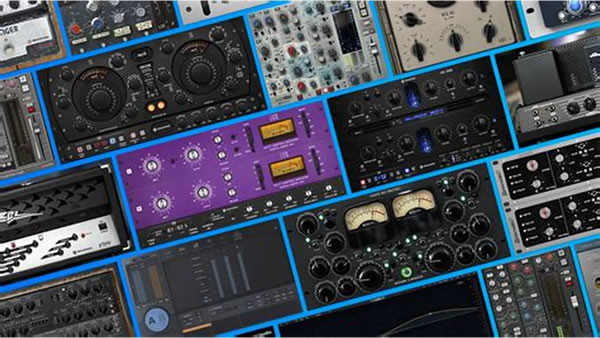
From vintage to modern cabinets, including bass cabs, the in-app Boutique will allow you to test and buy the ones you prefer for your guitar or bass amps ¡ª directly from the plugin¡¯s interface! There are currently over 300 speaker-cabs available, you can try them all.
Power-amp modelling
With the collection of cabs, you will find in the Wall of Sound plugin all the fantastic component-based tube power amp simulations. EL34, EL84, 6L6 or KT88 ¡ª simply choose the tube that will color your sound.
Mike like a Pro!
Want more focus? Get closer to the cone.
Two notes¡¯s exclusive proprietary cabinet and microphone measurement technology
accurately emulates the sound and process of miking a guitar or bass cabinet in a professional recording studio. |